We all know
the problem with Adobe Photoshop that causes the computer to freeze and/or reboot
spontaneously.
This was first discovered with the P2B-F series of motherboard and was still
there in some revisions of the P3B-F.
Amazingly enough Asus didn't care at all about it and the problem was dragged
into CUBX (at least the original model,
don't know about CUBX-E/L).
Adobe did come up with a workaround
but that was really slowing down the application.
But now thanks to
Christian Buess, an electrical engineer
from Switzerland we can teach Asus what to do to fix it.
Here's the report he sent me in:
Disclaimer. The report below describes the rework of a motherboard performed by myself and it is intended as information only. Should anyone decide to perform the same procedures, they hereby concur they will be doing it at their own risk. Tampering with the motherboard will cease its warranty immediately, and may damage the CPU and other components permanently. ASUS does not recommend, nor support this procedure.
I
thought you might be interested in the rework I did with my CUBX board.
Through your good Web site I learned that the CUBX board experiences locks/crashes
when using PhotoShop 5.5
I also have (had) that problem on my computer, and as I use PhotoShop a lot
I had to find a solution.
The fix presented by Adobe (removing the 'Extensions' folder) helped, but it
reduces performance...
The PhotoShop problem also happens on P2B.. and P3B.. boards from ASUS.
On the internet there are some hardware changes described that should solve
the problem.
The following link describes the solution for a P2B-LS: http://www.turbotech.ch/articles2000/000815-p2bls_rework.html
Unfortunately I did not find a link that described the rework for the CUBX.
From the link above I learned that the PhotoShop crash is caused by a transient
(spike) on the VTT termination voltage for
the AGTL+ bus of the PentiumIII.
After downloading the documentation for the PentiumIII (FCPGA and SECC2 package,
here) I decided
to do a similar rework
on my CUBX board.
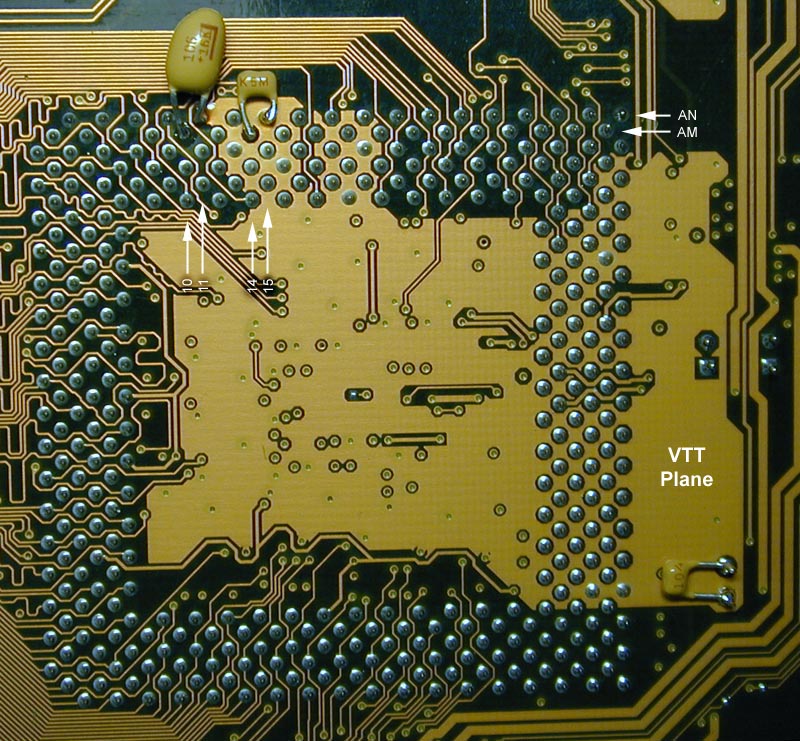
The attached picture shows the rework I did: Fortunately the VTT plane is on
the back side of the CUBX board.
This makes rework a little bit easier.
I added the following components:
1) A 10uF (mikro Farad) polarized tantalum capacitor between VTT (pin AN11)
and VSS(ground, pin AM10),
2) a 100nF (nano Farad) capacitor between VTT (pin AN15) and VSS (ground, pin
AM14)
3) a 100nF capacitor between VTT and VSS below the main capacitor for VTT.
The tantalum capacitor is used in addition to the main decoupling capacitor
of 100uF located on the CUBX board.
The two additional 100nF capacitors should additionally reduce high frequency
(HF) spikes on VTT.
According to my understanding it is important that the capacitors are mounted
with VERY short wires - this improves HF performance a lot. As the voltage on
VTT is only 1.55 V, the voltage rating of the capacitors is not critical.
The nice thing: After doing the rework there were no more crashes with PhotoShop!!
Now I am really happy with my CUBX board!! I think I have to mention that this
rework should only be done by experienced users!
It is not an easy job to do the soldering - you have to be very careful and
you have to have an appropriate soldering iron!
But on the other hand it really helps...
My system: CUBX, PIII 800, 320MB, Matrox G400. .