Introduction: nature of the failure
According to ASUS technical information, there is a design flaw in ASUS P2B-LS motherboards revision 1.02 and lower. An out-of-specification voltage applied to a CPU pin can make the system unstable or cause it to hang under heavy load, such as processing large images in Photoshop.
In the author’s system, even a disk scan or running several browser windows for an extended period could trigger a hang.
What to do about it
The documented fix adds a 10 µF or 22 µF polarized capacitor on the back of the motherboard, between the Slot 1 +1.5 V VTT pins and ground.
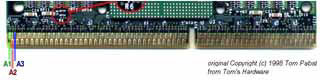
The capacitor is connected between pins A1/A3, which are joined on the motherboard, and pin A2. Pin A2 is ground; A1/A3 carry the +1.5 V VTT supply.
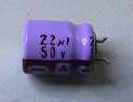
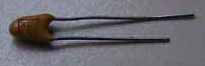
A small tantalum capacitor is preferable. If wires are necessary, keep them as short as possible because long leads can introduce electrical noise.
The relevant Slot 1 pins
The pins involved are A1, A2 and A3. On a Pentium II cartridge they face the heatsink and fan on the left side; the A1 marking can be found near the gold contacts.